Power and Energy
Power and Energy is a tab used to configure power and energy measurement performed by the LK4. In combination with the Scheduler function, it allows measuring energy consumption within selected time intervals, e.g., for different tariffs.
Starting from software version SW 1.24, it also enables reading dynamic energy prices from an external source (API) or setting a fixed energy price.
Page elements
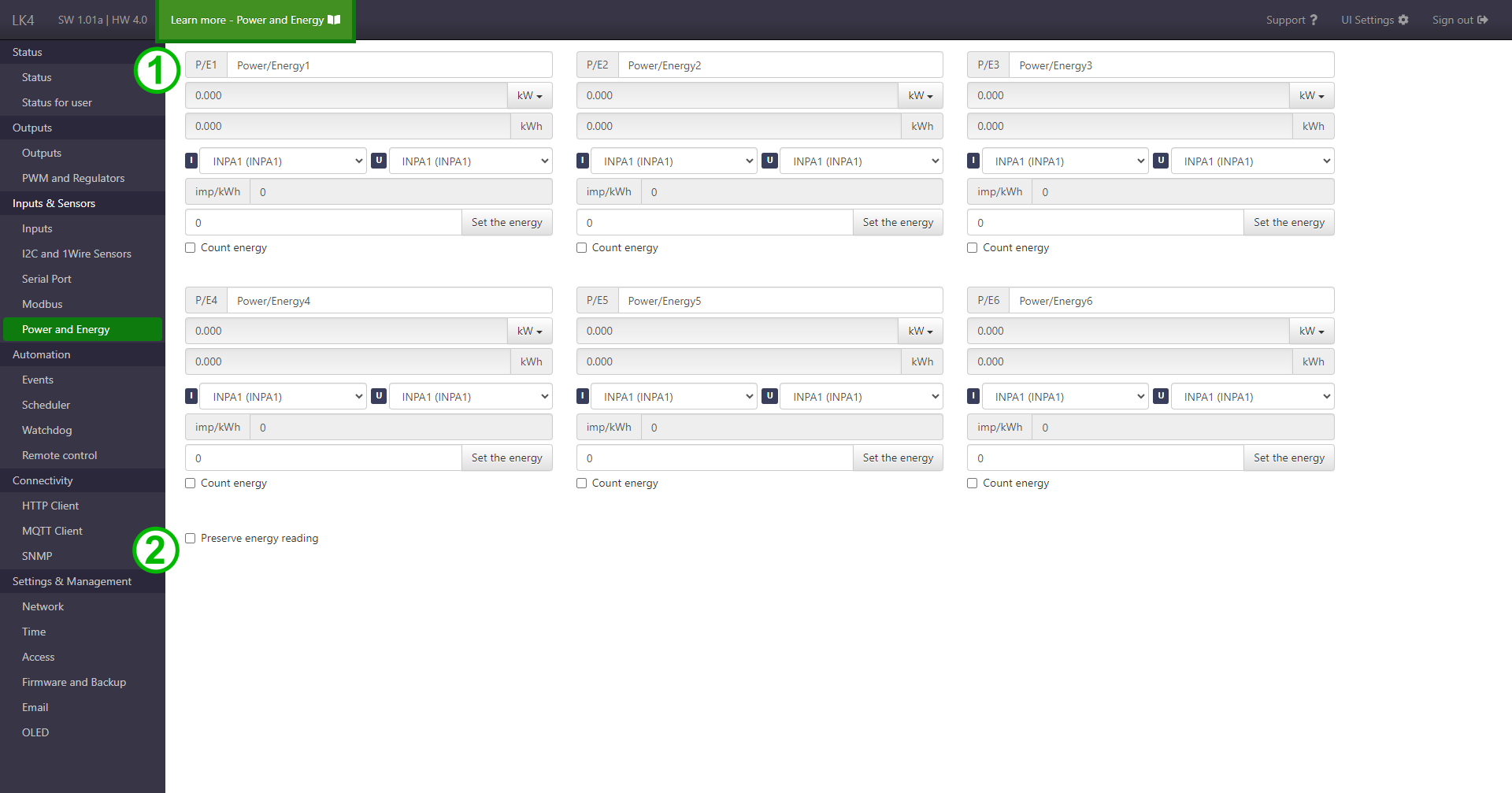
-
Section with readings and configuration of power and energy measurement.
Contains:
- setting the name,
- power and energy readings,
-
changing the unit of measurement,
Impact of the unit of measure option on the power value
Selecting this option may affect the displayed power value and, therefore, the energy count. The effect varies depending on the selected measurement inputs (I and U):
- I = INPAX and U = INPAX or constant voltage: the power value is returned in kW for each option, except:
W, for which the value is increased by a factor of 1000 (conversion from kW to W).
- I = INPDX and U inactive: the power value is returned in kW for each option.
- I = mX and U inactive: the power value is identical to the value under the mX variable for each option, except:
kW -> W- results in a 1000-fold increase (conversion from kW to W),W -> kW- results in a 1000-fold decrease (conversion from W to kW).
- I = INPAX and U = INPAX or constant voltage: the power value is returned in kW for each option, except:
-
selecting measurement inputs,
- setting the pulse-to-unit conversion factor,
- field for entering a new energy measurement value,
- enabling energy counting (Count energy).
-
Energy value retention function – when the Preserve energy reading option is enabled, the LK periodically saves the current energy counter values so they are not lost in the event of a device restart.
-
Dynamic energy prices section. Added in SW 1.24.
The function enables periodic reading of the energy price and making it available in the system as a variable.
The form contains:
- Enable this function – activates the energy price reading mechanism.
- Selection of price source:
- Dynamic prices – price retrieved from the selected API,
- Fixed prices – manual entry of a fixed value.
- Offset field – allows adjusting the retrieved price by a specified value.
- Selection of API source (e.g., PSE RCE).
- Configuration save button.
When the function is enabled, the energy price is:
- read cyclically every 15 minutes,
- read immediately after the function is activated,
- stored in the system variable
powerPriceFVal, - stored in the variable
m1.
The
m1variable can be used in other device functions, such as:- Events,
- MQTT Client,
- HTTP Client,
- OLED / VOLED,
- LTE Modem.
If the dynamic energy price function is active, other readings should not be mapped to the
m1variable.The currently retrieved energy price is displayed at the bottom of the section.
Setting the energy value
The energy reading in the field will change only when the Count energy option is enabled. Therefore, before setting a new energy value, it is recommended to activate this option first. Otherwise, the set value will appear in the reading field only after Count energy is enabled.