Power and Energy
Power and Energy is a tab for setting the power and energy monitored by energy meters with pulse output or measuring current and voltage from sensors connected to the analog inputs INPA1 - INPA6.
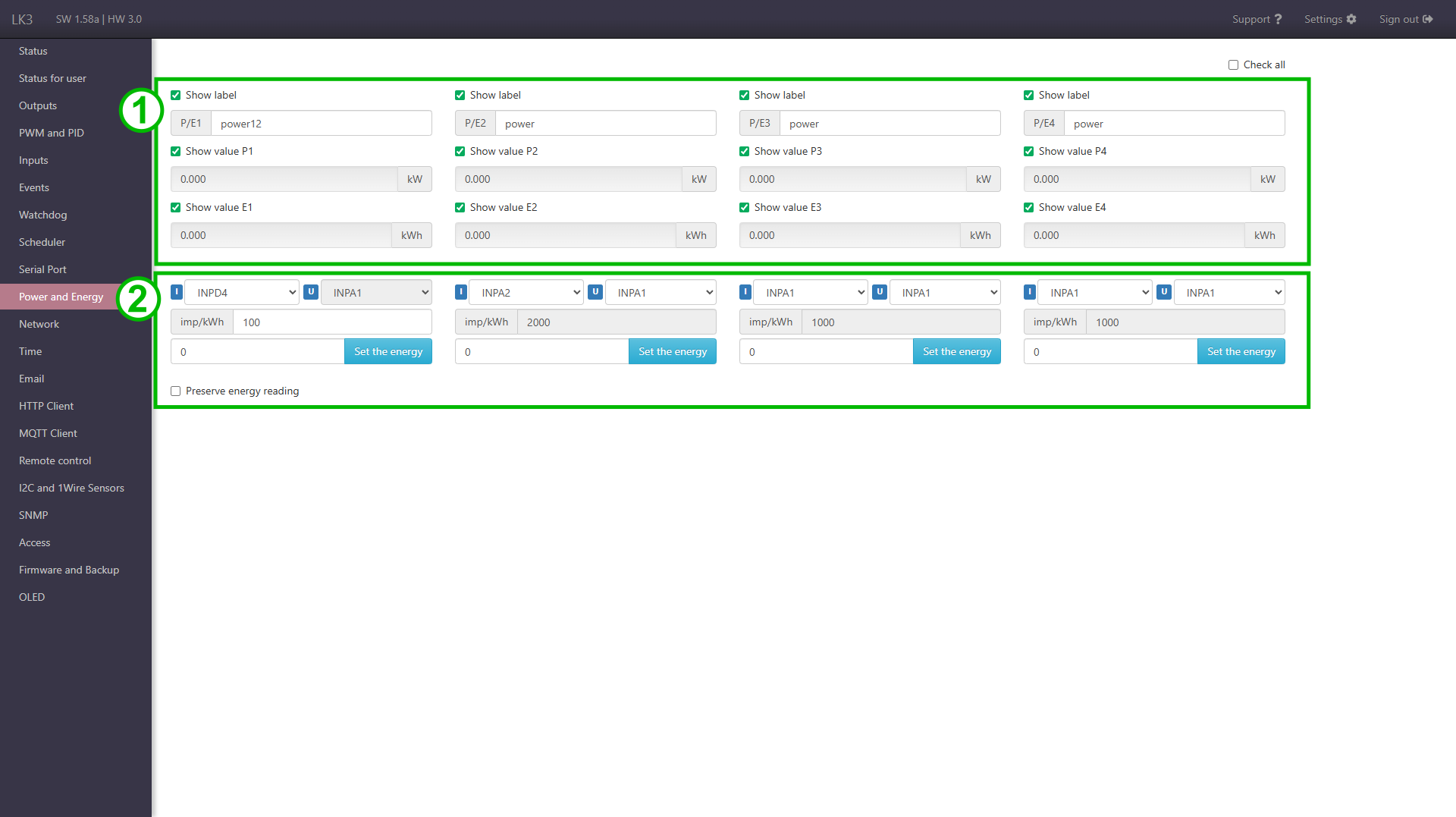
Elements of page
-
Name setting fields, power and energy measurements, and visibility check boxes for individual items on the Status page. In the upper right corner there is Check all checkbox to toggle visibility of all elements on Status page.
-
Measurement configuration.
Includes:
- selection of measuring inputs
- impulse conversion rate per kWh
- field for entering a new state of energy measurement
- function of storing readings (when selected, LK periodically saves energy values and restores them after a restart)
Measurement with counter with pulse output
To the logic input INPD1 - INPD4 connect + (plus) the pulse output of the meter, to GND - (minus) from the counter. Then in the drop-down menu select the input INPD1 - INPD4 to which the counter is connected, and in the field below enter the number of pulses for 1 kWh.
Measurement with analogue current and voltage sensors
From the left menu, select the INPA input to which the current sensor is connected, and in the right menu select the voltage input (sensor). In the case of measuring AC current with the SCT transconductors can be used to select the approximate voltage value in the electrical network.