Outputs
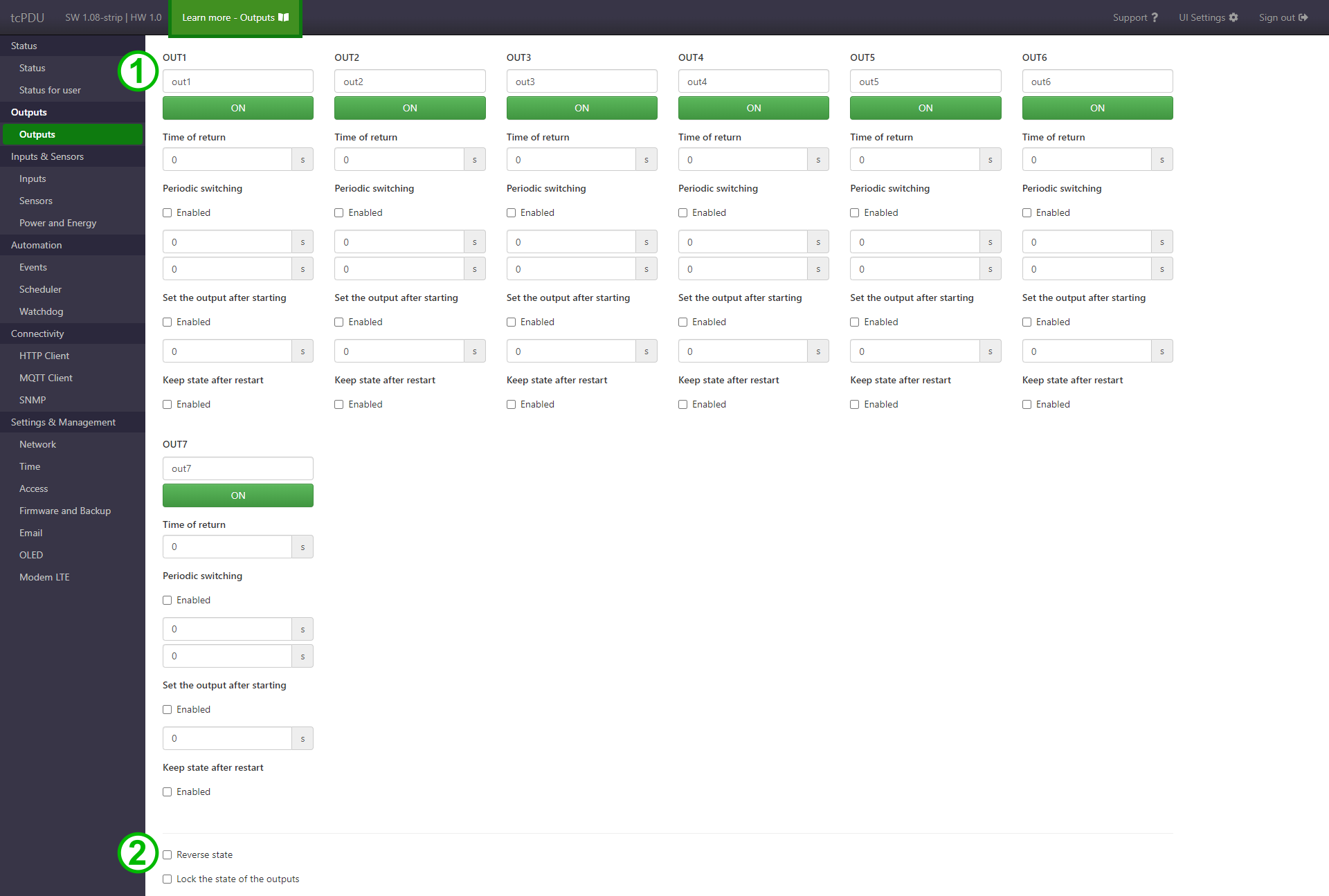
Page elements
-
Settings groups for individual outputs.
-
Fields for setting names and buttons for toggling output states.
-
Time of return.
Automatically changes the output state to the opposite state after the specified time (in seconds) from the first state change (triggered by the user or by the Events function). A value of
0means the function is inactive. -
Periodic switching.
The output will be cyclically turned on and off according to the configured times in the fields: on time and off time.
-
Set the output after starting.
This function allows the output to be automatically turned on after the device starts, with a specified delay (in seconds). It may be useful when controlling high-power loads to avoid switching multiple outputs on simultaneously.
-
Keep state after restart.
This function stores the current output state so that it is restored after the device restarts.
Note
In the tcPDU device, the state of OUT outputs is not changed during a software restart. This means that the outputs keep their current state regardless of this option.
Note
If the Keep state after restart option is enabled, the Set the output after starting function will have no effect.
-
-
Reverse state and lock the state of the outputs.
-
The Reverse state option logically inverts the output states (i.e., 0 is interpreted as ON and 1 as OFF). This does not affect the physical operation of the relay.
-
The Lock the state of the outputs option prevents the output state from being changed via HTTP requests, including the buttons on the page and direct GET requests to the device.
-